
Product overview
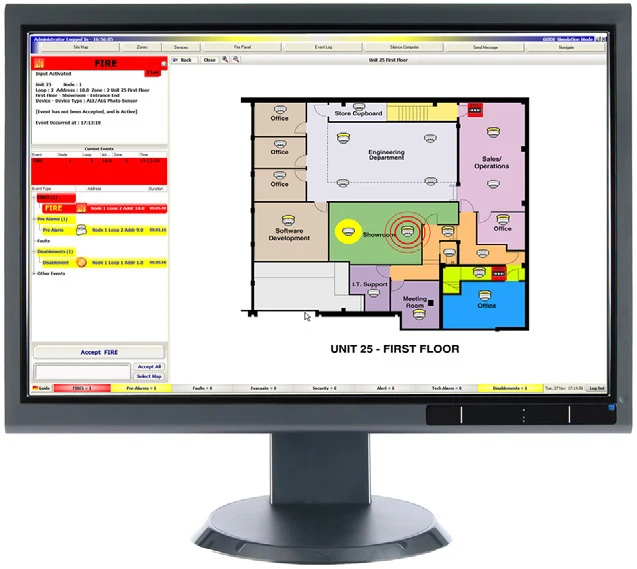
VES GUIDE provides a graphical workstation interface for compatible Elite and Elite RS fire alarm systems. Operators can view events using site maps, text and configured graphics, while user profiles determine permitted functions. Event-history tools support investigation and reporting across the licensed network size. The referenced sheet describes an older software platform, so a new project must confirm the current supported release, operating system and interface arrangement before specifying the workstation.
Technical specifications
| Brand / product range | VES |
|---|---|
| Product / system | GUIDE PC Graphical User Interface |
| Product type | Fire Detection |
| Product family | Fire Detection & Alarm |
| Subcategory | Apollo Addressable |
| Product function | Graphical PC user interface for compatible fire alarm systems |
| Compatible panel range | Elite and Elite RS, as stated in the source sheet |
| Presentation options | Maps, text, photographs, audio and event lists |
| History functions | Event archive, analysis and export to text or HTML |
| Access configuration | User profiles control available functions |
| Licence bands | 1; 2–4; 5–8; 9–16; 17–32; or 33–64 nodes |
| Ordering codes | VF1593-10 through VF1593-15, according to node band |
| Network interface | One USB port per network with the supplied isolated converter |
| Published graphics requirement | 1024 x 768, 16 million colours |
| Platform note | The sheet names legacy Windows versions through Windows 10; current operating-system support, software version and support lifecycle require confirmation |
| Supplied scope | Software licence and specified interfaces; confirm PC, display, installation and commissioning separately |
Key features
- Product function: Graphical PC user interface for compatible fire alarm systems
- Compatible panel range: Elite and Elite RS, as stated in the source sheet
- Presentation options: Maps, text, photographs, audio and event lists
Applications
Staffed fire alarm monitoring locations requiring graphical site information and event review across compatible panels. Define user permissions, workstation resilience, maintenance and the approved control scope in the project design.
Selection and project integration
Share the fire alarm drawings, equipment schedule, compatible panel platform and cause-and-effect requirements with UDCT. Selection should confirm device protocols, supported interfaces, circuit supervision, power and standby calculations, and the exact enclosure or module arrangement.
Use the current manufacturer documentation to check compatibility, wiring limits, software requirements and approval scope. Commissioning should verify the configured alarm, fault, indication and control functions as part of the complete system. Remote reporting also requires a compatible receiving service and confirmation of local network availability.
Manufacturer documents
Official product reference
View this product on the manufacturer website (opens in a new tab)